The platform

Every interaction becomes intelligence.

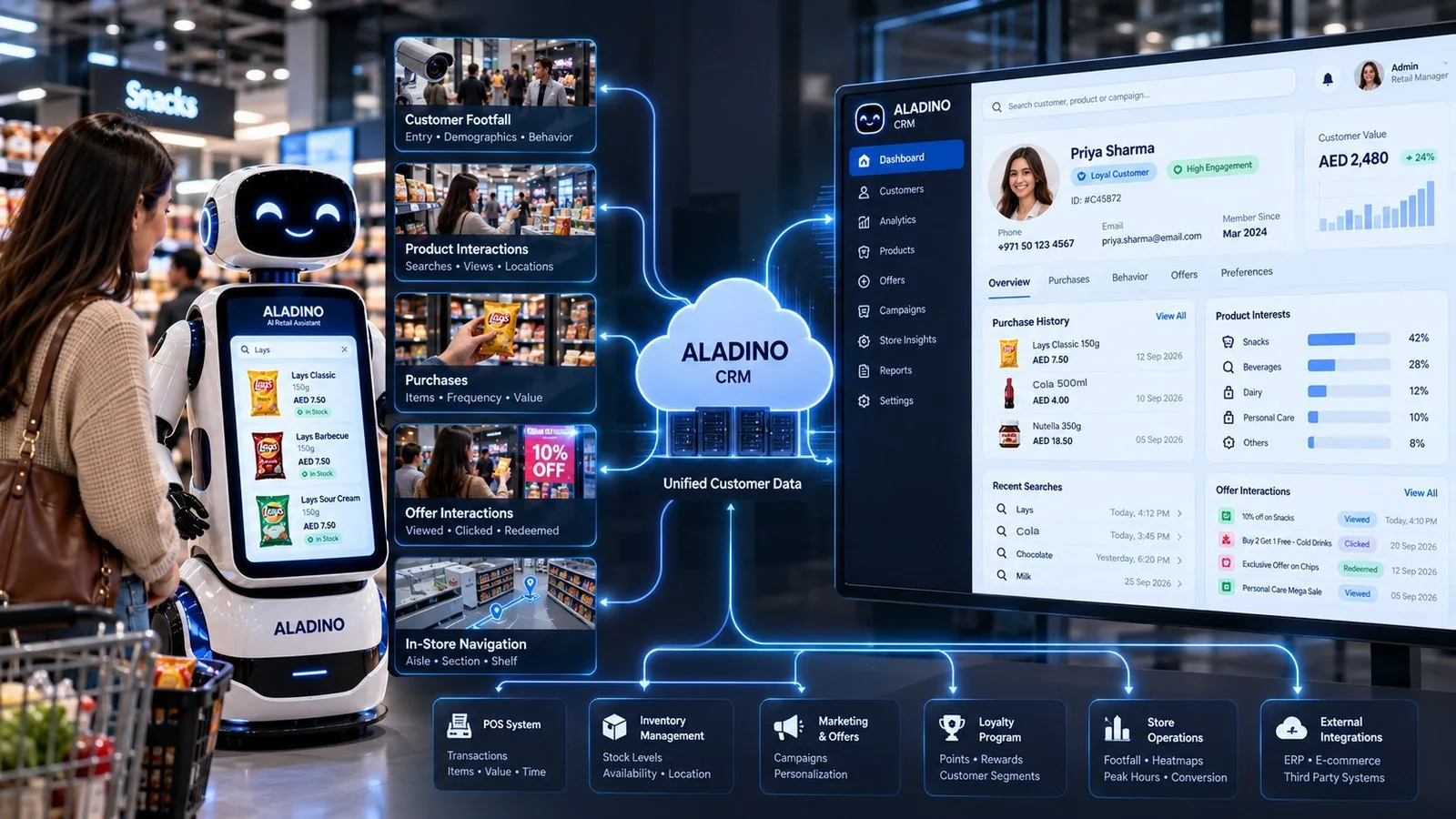
The CRM is the central place where customer and ALADINO activity is understood by the business: what people asked for, what they were shown, and what they did next.

Customer footfall, product interactions, purchases and offers flowing from the ALADINO robot into one CRM
Concept visual

Key principle

The goal is not just to know what the customer bought. The business should also understand what happened before the purchase.

  • ALADINO interaction
  • Customer action
  • CRM record
  • Business insight

What gets recorded

Searches and requests

What customers ask ALADINO for.

Products viewed

Products viewed or requested.

Offers shown

Which offers were presented, and when.

Offers accepted or not

What worked and what was ignored.

Recommendations

Which suggestions ALADINO made.

Purchases

Purchases and relevant outcomes.

Team follow-ups

Requests that need an advisor or manager.

Preferences and history

Customer preferences and interaction history.

Customer profile

One profile, built from every visit.

When a customer registers, purchases or interacts with ALADINO, their profile is created or updated.

Salvo R. · example profileReturning customer
NameSalvo R.
ContactEmail and phone on file
Preferred languageItaliano
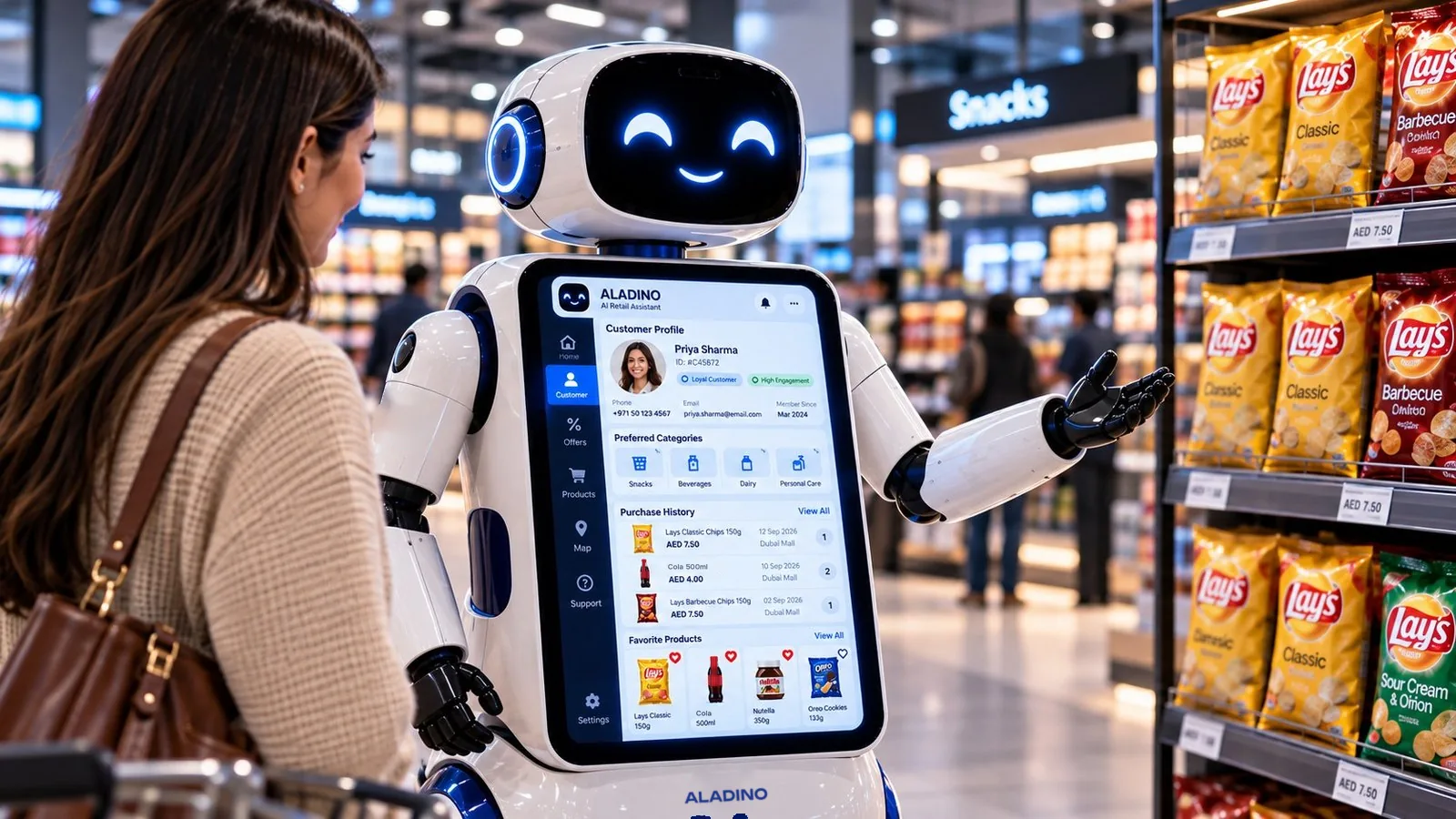
A customer profile with preferred categories, purchase history and favourite products on the ALADINO screen
Concept visual

CA & RM workflow

The routine stays with ALADINO. The rest reaches your team.

ALADINO handles routine questions. When a request needs a person, it moves the conversation into your team’s workflow, for your customer advisors (CA) and relationship managers (RM).

  • The customer asks to speak with someone
  • A complex or high-value enquiry
  • A complaint or service issue
  • A special product or business request
  • A sales opportunity that needs follow-up
Handoff to the teamFollow-up needed
Who the customer isSalvo R., returning customer. Preferred language: Italian.
What they asked“Can I speak with someone about a bulk order of water?”
What ALADINO showedStill water 6 × 1.5 L, out of stock. One alternative and one offer.
Action requiredCall back about the bulk order. Possible sales opportunity.

Example handoff. The team sees enough context to understand who the customer is, what they asked, what ALADINO showed them and what action is required.

  • Customer
  • ALADINO
  • Qualify
  • CA / RM
  • Follow-up
  • CRM

Business dashboard & insights

See what customers ask for, and what actually sells.

The business should be able to understand what customers are asking for and what is converting into sales.
Store overviewExample data
Total footfall1,248
Store entries1,126
Avg. dwell time12 min
Total salesAED 18,420
AI interactions342
Offer conversion12.8%

Footfall through the day (visitors per hour)

Top searched products (searches)

  • Chips420
  • Cola380
  • Chocolate310
  • Milk290
  • Organic snacks210

Questions the dashboard answers

Most searched productsMost purchased productsHigh-value productsProducts with low salesFrequently viewed but rarely purchasedMost effective offersOffers shown vs. acceptedPopular categoriesCustomer activityRecommendation performance
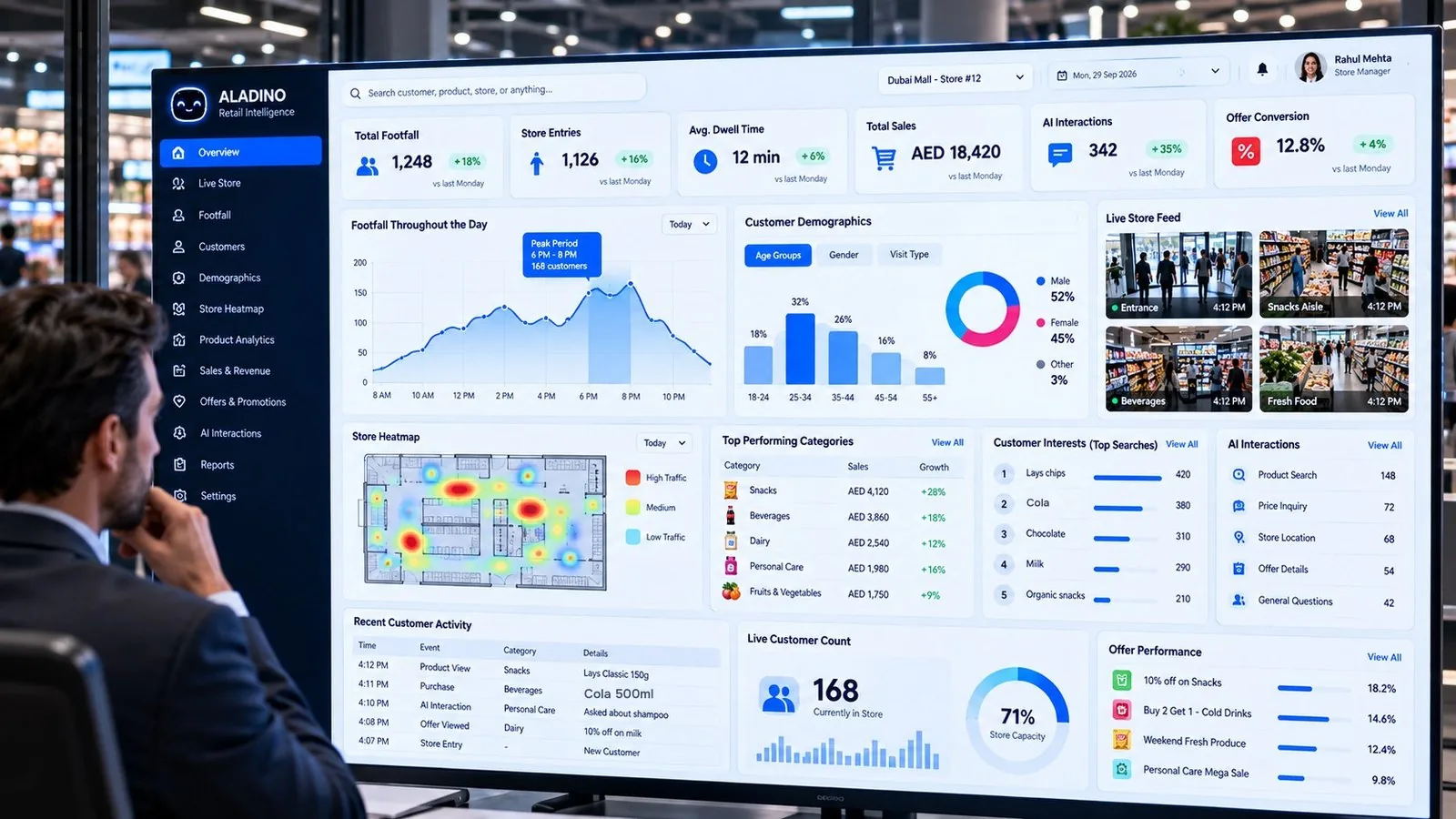
ALADINO retail intelligence dashboard with footfall, demographics, heatmap and offer performance
Concept visual
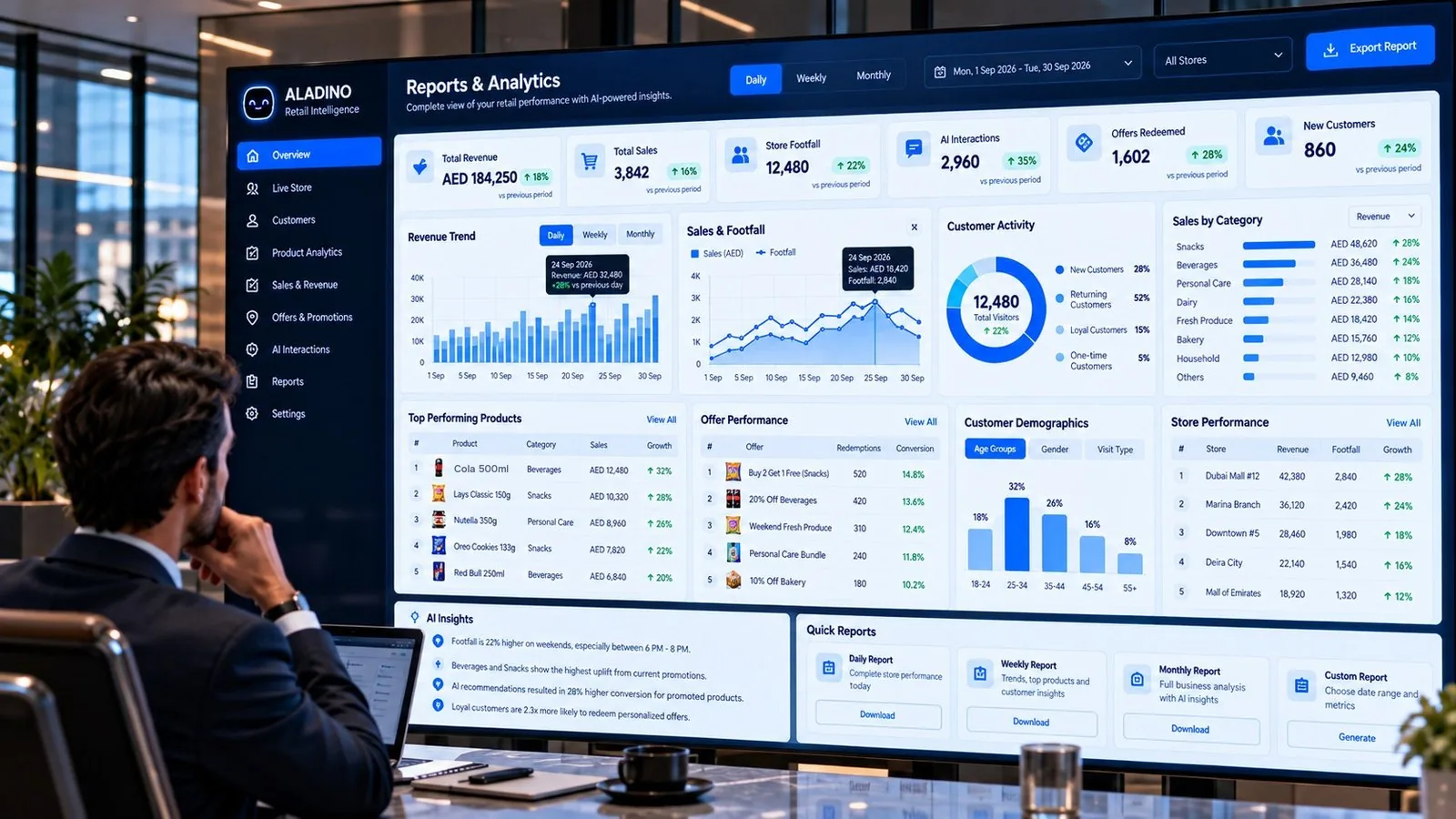
ALADINO reports and analytics screen with revenue trend, sales by category and store performance
Concept visual

Example insight

Searched 5,000 times. Bought 400.

5,000Searches
vs
400Purchases

A product may be searched 5,000 times but purchased only 400 times. Customers are interested, but something may be stopping the purchase.

Bars drawn to scale: purchases are 8% of searches. Price, stock, placement or the offer could be the cause, and the dashboard shows where to look.

AI camera ecosystem

One vision engine. Every camera reports to the CRM.

Cameras add what a conversation cannot see: who comes in, where they go, and what is happening at the pumps. The vision engine turns each camera feed into events, and every event lands in the CRM.

  1. AI camerasEntrances, aisles, checkout and forecourt. Standard and thermal.
  2. Vision engineDetects people, vehicles, fuel and heat in each frame.
  3. EventsAn entry, a dwell, a queue, a spill, a hot spot.
  4. ALADINO CRMEach event is saved with time, camera and location.
  5. Dashboards & alertsReports for management. Alerts for the team on site.
RECCAM 01 · ENTRANCE00:00:00
Illustration · example readings

Customer analysis

How customers move and behave inside the store, attached to the visit in the CRM.

  • New or returning visitor
  • Dwell time by zone and aisle
  • Journey from entrance to checkout
  • Queue length and waiting time
  • Heatmap of busy and quiet areas

Footfall reporting

A full count of who came in and when, so sales can be read against visitors.

  • Entries and exits by entrance
  • People inside right now
  • Hourly, daily and weekly totals
  • Peak hours and quiet hours
  • Visitors compared with purchases

Fuel loss & thermal monitoring

Thermal cameras watch each pump while a vehicle refuels and keep watch on equipment temperature.

  • Fuel spilled or lost during refuelling, with an estimate
  • Pump, nozzle and hose temperature
  • Hot-spot alerts on pumps and equipment
  • Snapshot and time saved with every alert
  • Alert sent to the station team at once

From the camera to the customer record

  1. A camera sees something: a person at the door, a queue forming, fuel on the ground.
  2. The vision engine recognises what it is and measures it.
  3. An event is created with the time, the camera and the place.
  4. The CRM saves the event and links it to the visit, the store and the pump.
  5. Dashboards update, and anything urgent goes to the team as an alert.

Privacy by design

Footfall and behaviour are recorded as counts and movement, without names. Recognising a named customer is used only where that customer has agreed to it and local law allows it.

Camera locations, what is recorded and how long it is kept are agreed for each site.

Connections

Built to sit at the centre of your systems.

ALADINO CRM brings customer data together from the systems a store already runs. The exact connections are agreed for each deployment.

  • POS system: transactions, items, value, time
  • Inventory management: stock levels, availability, location
  • Marketing & offers: campaigns, personalisation
  • Loyalty programme: points, rewards, customer segments
  • Store operations: footfall, heatmaps, peak hours
  • AI cameras: footfall, customer analysis, fuel loss and thermal alerts
  • External integrations: ERP, e-commerce, third-party systems
ALADINO

See ALADINO in your store.

Bring your products, your offers and your questions. We will show you how ALADINO answers them.